
AI customer support connected to your orders
AgentDesk is the helpdesk we built at Nexttia. It classifies every ticket as it arrives, drafts the reply with the order data and, in the categories that have already been tested, resolves it without anyone touching it. A customer service team already works with it in production.
Multilingual
Your team writes in one language, customers read theirs
Your categories
Built from your past tickets and assigned by the AI on arrival
Shadow mode
The AI proposes and gets compared before it acts alone
From your current helpdesk to AgentDesk
The switch is prepared well in advance and the team keeps handling tickets throughout. AgentDesk runs alongside the old tool until cutover, and open tickets are moved over without emailing a single customer. The AI doesn't reply on its own in any category until it has been tested.
Side by side
Switching without interrupting support
Both systems run at the same time and cutover is planned channel by channel. Until it's cancelled, the old tool stays available in case you need to roll back.
Multilingual
One team for every language
The customer writes in their language. The agent replies in Spanish and the customer gets the translated answer, with the signature and legal text of their country.
Per category
The AI resolves on its own what has been tested
Shadow mode comes first: the AI prepares what it would do and it is compared with what the team does. A category such as order status or cancellation only starts resolving on its own when the two match.
What we measured in a live rollout
Measured on the tickets of a customer service team in production, a few weeks after go-live.
+42%
More work done per person
Interactions per agent per day compared with the previous tool, calculated with the same formula. The figure includes the replies sent by the AI.
60%
Cases closed without a person stepping in
Six out of ten closures: the ones the AI agent solves by replying to the customer, plus automatic closures that needed no reply.
24%
Solved by the AI from start to finish
One in four closed cases was handled only by the AI agent, with nobody on the team writing.
Every mailbox in the same inbox
If you have one mailbox per language, another for data protection requests and the help center form, everything lands here already tagged with category, priority and language. Routing serves urgent tickets first, then the oldest unanswered ones.
- Microsoft 365 or IMAP email plus the help center form. Web chat, WhatsApp or phone are connected as custom work
- Round robin, least-loaded or skill-based assignment
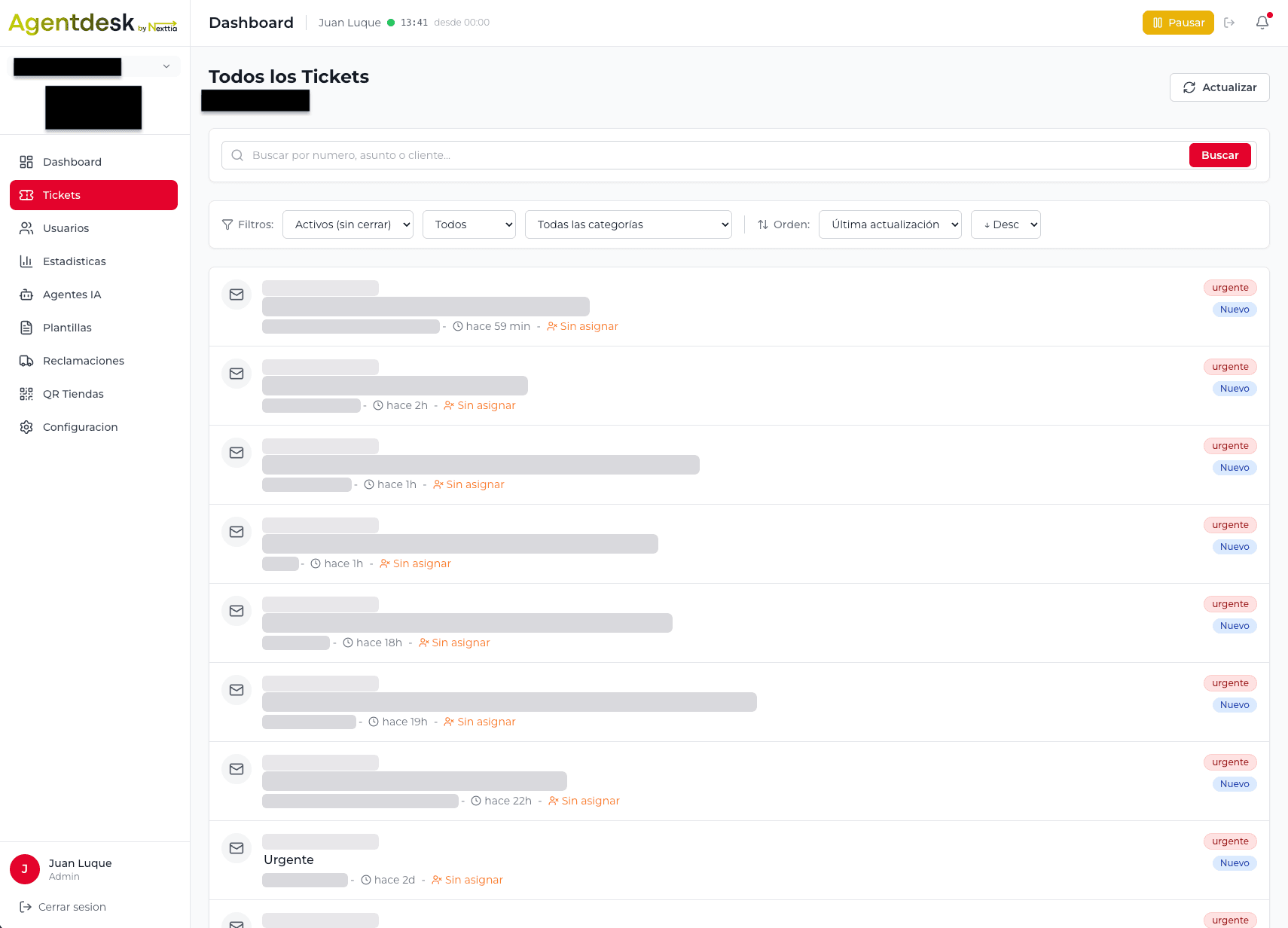
Order, tracking and history on one screen
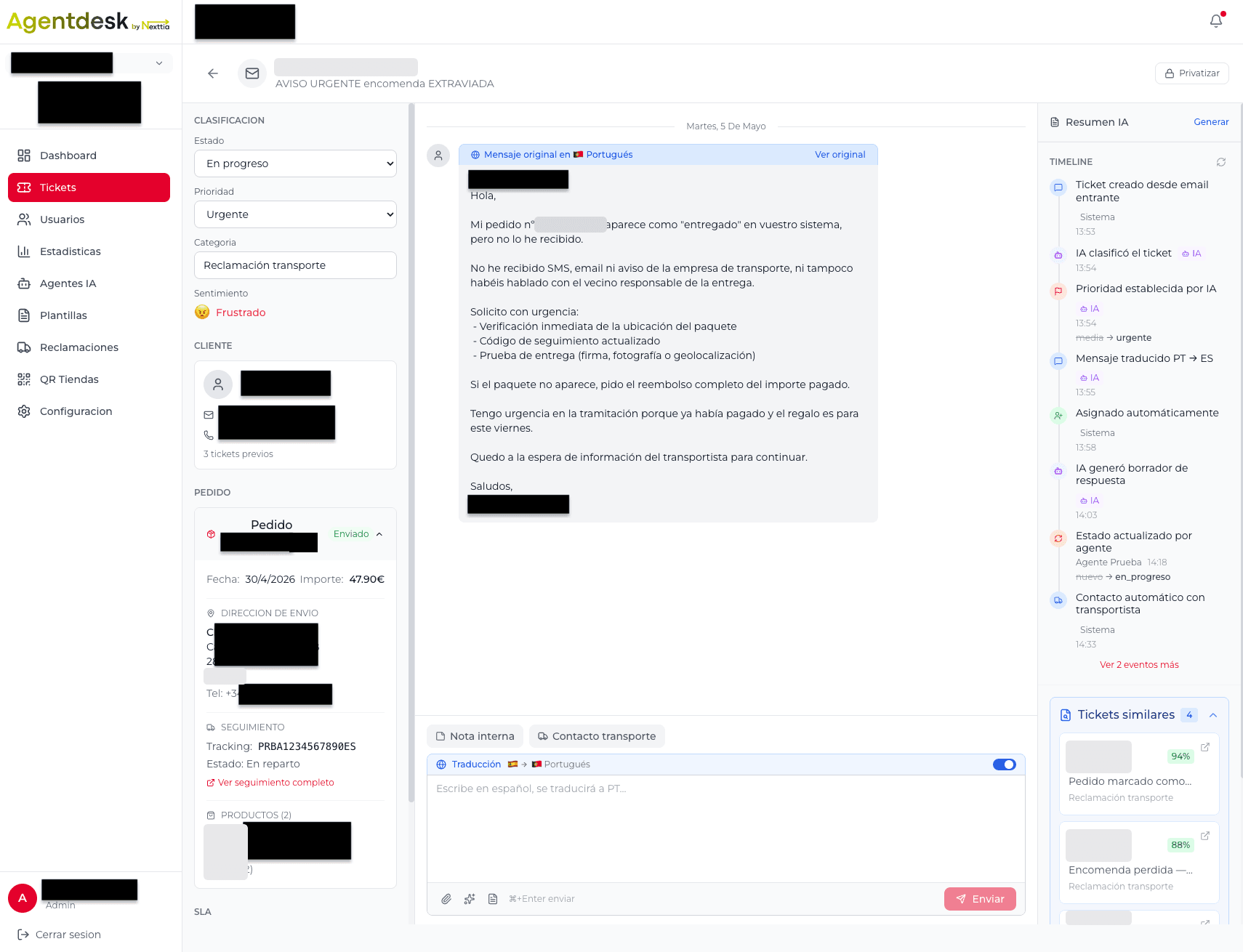
When an agent opens a ticket, the order has already been found in the WMS, along with the carrier tracking and the customer's previous cases. If the AI set the ticket aside for a person, it leaves a note with the reason, the shipment number and the dates.
- The customer's message arrives translated and the reply goes out in their language
- A draft with the order data that the agent can use, edit or discard
- Cancel, change the address or chase the carrier from the ticket itself
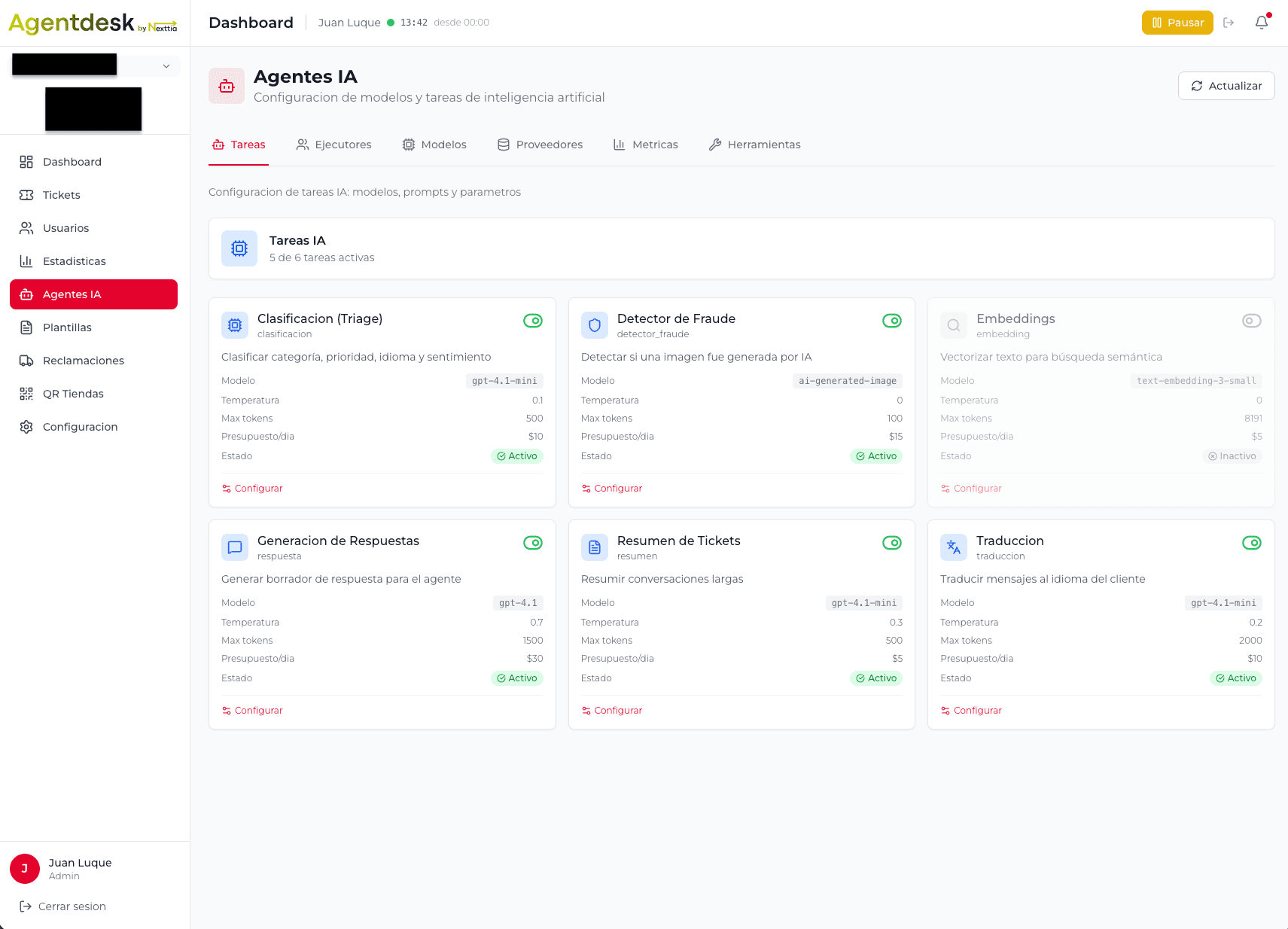
A switch for every category
For each type of request you decide whether the AI is off, in shadow mode or resolving on its own. In shadow mode it checks the systems and prepares what it would do, but writes to nobody: the proposal is logged and compared with what the person did. It is only switched on where the two match.
- A short list of tools: look up the order, check tracking, cancel, change the address, reply or hand over to a person
- Formal complaints, legal matters, invoices, GDPR requests and suspected fraud always go to a person
- Classifying, translating, summarising and drafting can each use a different model
- Every client gets its own Azure OpenAI resource
What AgentDesk does in your team's day
From the moment an email arrives to the next morning's report.
Classification on arrival
Each ticket is analysed as soon as it arrives: category, priority, language and tone. The categories are built from your company's real ticket history.
- Priority and response deadline per subcategory
- Very angry customers, or those mentioning consumer bodies or lawyers, go to a person
- Flags AI-generated photos attached to claims
Drafts and templates
The AI suggests a reply using the order and customer data. Templates come from the way your team actually answers, and a person reviews them before they go live.
- Order variables filled in automatically
- Every night new templates are proposed from the day's replies
Routing and deadlines
Tickets are assigned round robin, by workload or by skill, and you can limit which cases reach each agent level. Deadlines are checked every five minutes, respect working hours and public holidays, and warn you once 75% of the time has gone.
- First response and resolution deadlines
- Escalation rules when a ticket gets stuck
- Automatic rescue of anything unanswered for more than ten days
Supervision and reporting
Supervisors see unassigned and urgent tickets and deadline compliance in real time. Statistics can be broken down by category, channel and agent, with tickets handled, closed and reopened.
- Throughput per hour of actual work
- Reopen rate, to check that closed really means solved
- AI cost included in the report
- Admin, supervisor and agent roles
What the AI can resolve on its own
Each automation has one job, its own switch and rules for when not to act. Before writing to a customer it checks the WMS and the carrier's real tracking.
Order status
It only replies in four clear situations: still in the warehouse within the normal time, the carrier tried to deliver, the parcel is at a pickup point, or it is in transit with recent movement. Anything else goes to a person.
Cancellations and address changes
Carried out in the WMS while the order has not left the warehouse. Once the parcel is on its way, the case goes to the team.
Progress updates
Several times a day it reviews “where is my order?” tickets. If the order has moved on since the customer asked, it tells them and closes the ticket.
Stuck shipments
It writes to the carrier, watches for the reply and, if the answer contains something useful, passes it on to the customer in their language.
Missing information
If the order number, a photo or any other detail is missing, it asks the customer before the ticket reaches anyone.
Suspicious photos
It checks images attached to claims and flags the ones that look AI-generated so that a person can review them.
It never promises an exact delivery date, never blames the carrier and never makes up data. When it sets a ticket aside, it writes down why.
From shadow mode to autonomous, one category at a time
Nothing is automated on day one. This is the order we follow.
Categories built from your tickets
We group past tickets by what the customer actually wrote, whichever department the ticket ended up in. That gives the categories, their priority and their deadline.
AI in shadow mode
For each candidate category the AI checks the systems and prepares what it would do, but sends nothing. Its proposal is stored next to what the agent did.
Compare, then switch on
We go through the differences with the team. A category only becomes autonomous if the AI's proposal matches what a person would have done.
Exit rules
Even in autonomous mode some cases always go to a person: the order is not in the system, it shows as delivered but the customer says it never arrived, it has been in the warehouse for more than ten days, or the customer is very angry or mentions consumer bodies or lawyers.
Ongoing review
We keep checking what the AI closed, what it set aside and why. If a reason keeps coming up (for example, a type of request the AI has no procedure for yet), it either gets the missing procedure or stays with the team.
When AgentDesk makes sense and when it doesn't
It makes sense if
- You get hundreds of tickets a day and many of them are about an order
- You support several languages and don't want a team per language
- Your WMS, ERP or online store can be queried through an API, so the AI can check and act
- You want your own AI resource and, if needed, the platform installed on your own server
Probably not if
- You get a few dozen tickets a day. An off-the-shelf helpdesk is quicker to set up and cheaper
- None of your systems lets you look up orders: the AI could only draft, not resolve
- You need WhatsApp or phone as your main channel from day one. Today they are connected as custom work, not out of the box
If you're not sure, that's what the audit is for: we tell you what we would do with your data before anyone talks about implementation.
What we need from you to get going
Onboarding happens in a portal with 17 steps grouped into six blocks. Anything you'd rather not fill in yourself, we prepare for you.
Company and brand
Ticket volume, company details, tone of voice and the domain emails will be sent from.
Team and hours
Who handles support, in which role, during which hours, and which public holidays count towards deadlines.
Channels
Your mailboxes (Microsoft 365, Google or IMAP) and any other channel that needs a custom connection.
Categories, deadlines and templates
We start with the five or ten requests you receive most, each with its deadline and standard reply.
Systems
ERP, online store and carriers. If AgentDesk will run on your own server, its sizing too.
History and launch
Which tool you use today and what to do with its history, the help center if it's included, and a final review before going live.
Before, during and after rolling out AgentDesk
The help center cuts what reaches the queue, the audit tells you where to start and the migration brings over what you already have.
AI help center
Articles in several languages, search by keyword and by meaning, an assistant that only answers from your documentation, and order lookup. Whatever isn't solved there reaches AgentDesk already classified.
How the help center worksHelpdesk migration
We move open tickets, templates and articles from your current helpdesk, with both systems running side by side until cutover.
What gets migrated and what doesn'tCustomer support audit
We analyse your real tickets to see what comes in, how long replies take, which categories are missing and what can be automated safely.
What the audit includesWhat people ask us before the demo
How is AgentDesk different from a standard helpdesk?
General-purpose helpdesks on the market are very complete tools, and for many companies they're the sensible choice. We build AgentDesk ourselves and connect it to your systems: the AI checks the order in the WMS, cancels it or changes the address when appropriate, and replies in the customer's language. Each client has its own Azure OpenAI resource and the platform can be installed on the client's server.
Does the AI reply to customers on its own?
Only in categories that have been tested first. Each type of request has three modes: off, shadow (the AI prepares the reply but doesn't send it) and autonomous. Requests such as order status or cancellations move to autonomous when what the AI proposes matches what the team does. The team handles the rest, with drafts to help.
What happens when the AI can't resolve a ticket?
It hands it to a person with a note explaining why and the data it has already looked up: order, shipment, tracking and dates. Formal complaints, legal matters, invoices, GDPR requests and suspected fraud always go to a person.
Which languages does AgentDesk support?
AgentDesk is multilingual. The customer writes in their language, the agent reads and replies in Spanish, and the customer receives the translated answer with the signature and legal text of their country.
Where is the data stored and which AI model does it use?
We use Azure OpenAI with a separate resource for each client. The deployment can sit in the European Union data zone and the platform can run on the client's own server. The model for each task (classifying, translating, drafting) is configured separately, so one can be changed without touching the others.
How long does it take to roll out AgentDesk?
It mostly depends on integrations and history. With several languages, a WMS integration and a migration from another helpdesk, months go by between the study and go-live. A single-language operation with no migration and a store that's ready to connect moves much faster, but we'd rather give you a timeline once we've seen your systems.
More on AI and customer data
Tell us about your customer support
Let us know how many tickets you get a day and which tool you use. We'll prepare the demo around cases like yours and tell you what we'd automate first and what we'd leave with your team.